There is no separate bulk tool. The ordinary email invitation screen is the bulk tool, and it is built for long lists.
Pasting a list of addresses
Copy the email column out of your spreadsheet or your applicant tracking system and paste the whole thing in. Addresses can be separated by new lines or commas, and mixing the two is fine.
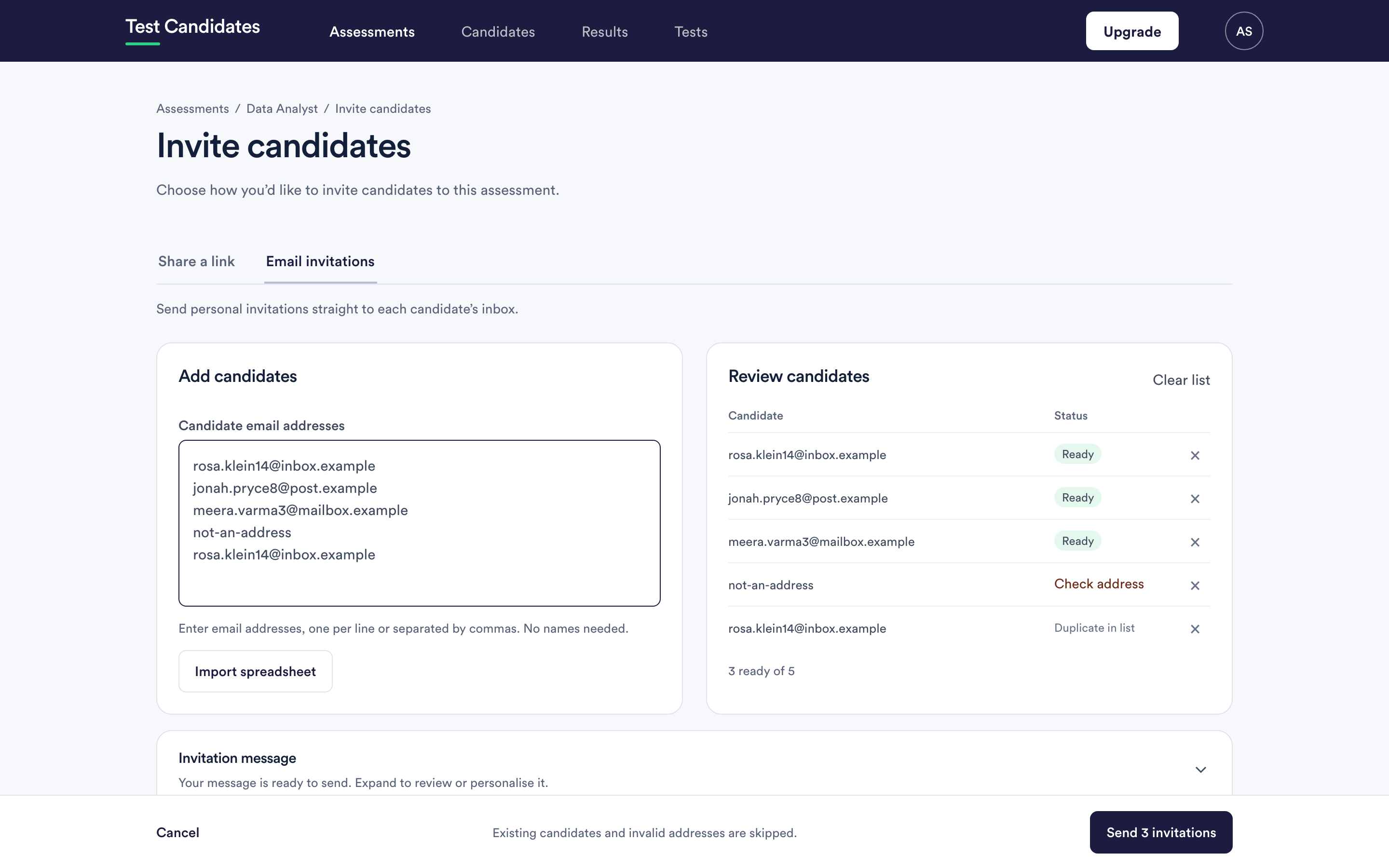
Every row is checked before anything sends, so a malformed address in the middle of two hundred good ones does not stop the batch. It is marked Check address and skipped.
Duplicates are safe. The same address twice in your paste is invited once, and an address already on the assessment is skipped rather than invited again.
Uploading a spreadsheet
The candidate uploader accepts CSV, XLS and XLSX files. It adds the people to your list for review; it does not send anything by itself. You still review and send from the invitation screen.
Use it when your list has names as well as addresses and you want the greeting personalised, or when you want to keep your own reference against each person.
The template. In the Import spreadsheet box, click Download template for a ready-made file with the headings First name, Surname, Email and Reference and one example row (a CSV version is there too). Fill it in, then choose it with Choose file. Your own spreadsheet works just as well.
Columns. One person per row. If your first row has headings, they are read: Email, First name, Surname (or Last name), Name (split into first name and surname) and Reference (also read from Ref, Client, Job or ID). Without headings, the address column is found by itself, the cells before it are the name and the first cell after it is the reference. Other columns are ignored. An export straight from your ATS usually works as it is.
Reference. Whatever you put in the reference column, such as the client's name, a job number or your ATS id, is kept with the invitation and shown in the review list, the results list and on the Invited tab. It is never shown to the candidate.
Already invited. Besides existing candidates, the review list checks people who have been invited to this assessment but have not started yet, and marks them Already invited so they are not sent a second email.
After you send
Every person gets a result line: Invited, Already invited, Already a candidate or Not sent. The list stays on screen until you choose Back to the assessment or Invite more people, so a long batch can be checked row by row.
Running a large batch
- Send it in one go. Splitting a list across several sends makes the reminder timings differ per candidate, because reminders count from each person's invitation.
- Leave the window open while a large batch sends. It tells you how far through it is.
- Check the count afterwards on the assessment. The candidate total should match what you expected minus the skipped rows.
Or skip invitations entirely
For genuinely large intakes, a shared link is usually better than a list. You put one link in the advert and candidates register themselves, with no list to maintain and nobody left out because their address was typed wrong. See share your assessment link.
The trade-off: people who register through a link have no invitation, so automatic reminders do not apply to them.
What a bulk invitation costs
Sending invitations is free, whatever the volume. You are charged only for candidates whose results unlock. See when a candidate is charged.