Account menu, then Integrations, then the API key section.
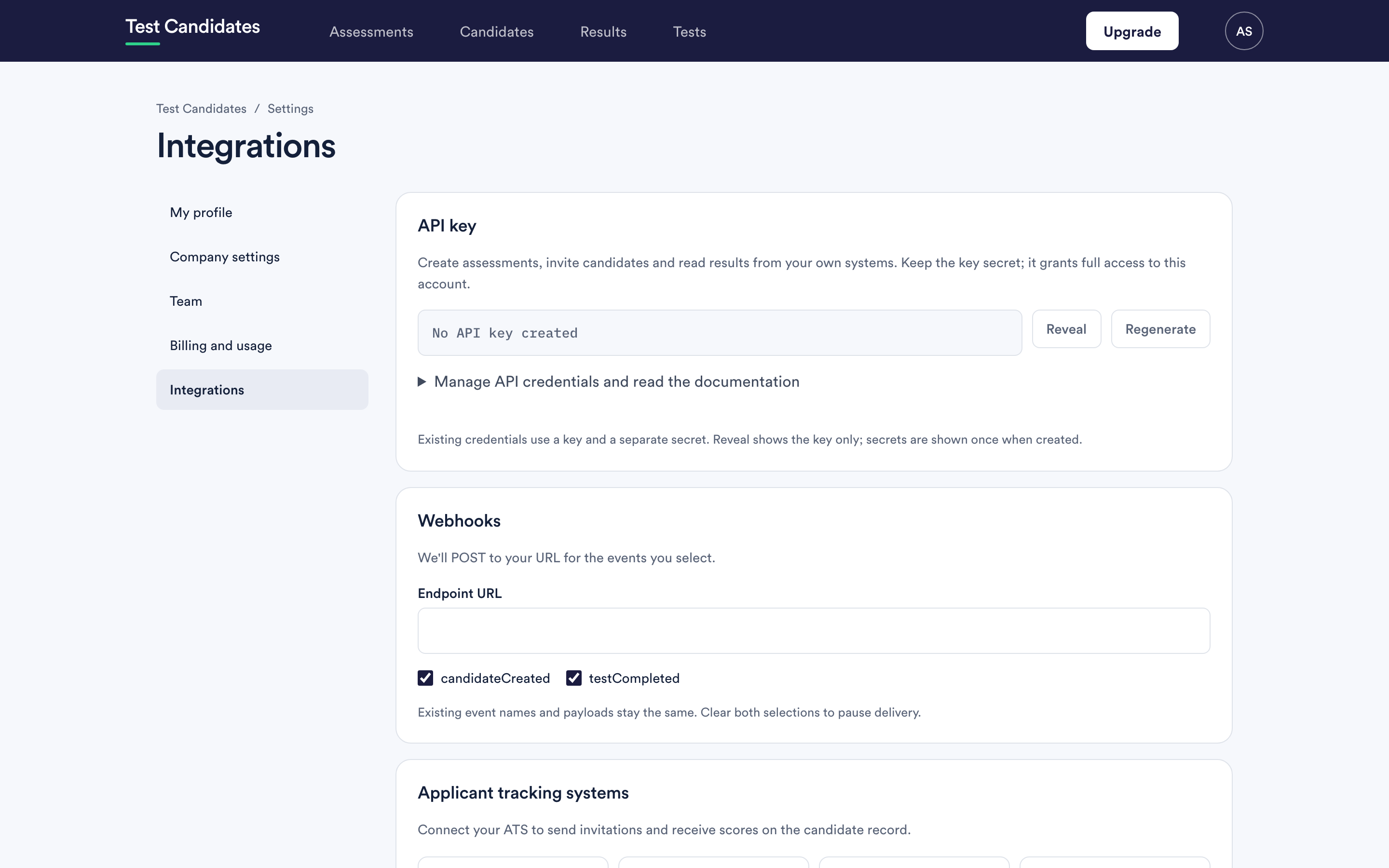
Your credentials
A credential is a key and a secret. You send both on every request.
The secret is shown once, when it is created. Save it somewhere safe at that moment. Reveal on the integrations page shows the key only; it cannot show you the secret again. If you have lost it, regenerate the credential and update whatever was using it.
Live and sandbox keys
A workspace can hold two kinds of key side by side, like a payment provider's
live and test keys. Tick Sandbox key (test mode) when you create one; its key
starts with SBX.
With a sandbox key, the people you invite become test candidates. They get the real invitation email and sit real tests, but their results are never charged and never use your free results. A sandbox key reads test candidates and their results only, and a live key never sees them, so a system you connect to a live key is never polluted by tests. Assessments are shared between the two. Test candidates show a Test badge in the app and can be deleted like any other.
A workspace may create 25 test candidates in any 30 days. The full rules are on the developer documentation.
Authenticating a request
Send the key and secret in the Authorization header, in either of two forms:
Authorization: Bearer <key>:<secret>
Authorization: Basic <base64 of key:secret>
For Basic, the key is the username and the secret is the password, so most HTTP clients will build the header for you if you hand them the two values.
A missing, malformed or wrong credential is answered with 401 and the error
code unauthorized. An unknown key and a wrong secret get the same answer.
The base URL
https://www.testcandidates.com/api
The same API also answers at https://api.picked.ai/assessment. Use whichever
you prefer; the paths after it are the same.
Your first request
List your assessments:
curl https://www.testcandidates.com/api/v1/assessments \
  -H "Authorization: Bearer $TC_KEY:$TC_SECRET"
Every answer is JSON. A successful list looks like
{ "data": [ ... ], "meta": { "nextCursor": ... } }, and an error looks like
{ "error": { "code": "...", "message": "..." } }.
What you can do
| Endpoint | What it does |
|---|---|
GET /v1/tests |
List the tests an assessment can be built from |
POST /v1/assessments |
Create an assessment from test slugs |
GET /v1/assessments |
List your assessments |
GET /v1/assessments/{id} |
Read one assessment |
POST /v1/assessments/{id}/invitations |
Invite up to 100 people to an assessment by email |
GET /v1/candidates |
List your candidates, each with their assessments and results |
GET /v1/candidates/{id} |
Read one candidate |
GET /v1/results |
List completed tests, oldest first, from a time you choose |
Parameters, example requests and responses, errors, pagination and rate limits are all in the API reference. If you are building a product on the API, start with the ten-minute quick start in the developer documentation.
Everything is scoped to the workspace the credential belongs to. You cannot reach anyone else's data and nor can anyone reach yours. An id from another workspace is answered exactly like an id that does not exist.
Inviting through the API
An invitation sent through the API is the same as one sent from the app. The person gets the same email, and the same rules apply: an address already invited to that assessment, or already a candidate on it, is not invited again. A closed assessment, or one past its deadline, refuses new invitations.
Invitations through the API only work once someone in your workspace has confirmed their email address.
What the API cannot do
You cannot create or edit an assessment, unlock a result, record a decision, remove a candidate or change a setting through it. Those happen in the app.
Locked results
A completed test appears in the API as soon as the candidate finishes it, but
its scores are null, and unlocked is false, until the result is unlocked.
That is the same rule the app applies. See
unlock results.
The original endpoint still works
If you built against the original endpoint, GET /candidates, it still works
and has not changed. It uses page numbers rather than cursors and has its own
error format. New integrations should use the /v1 endpoints above.
Regenerating your key
Regenerate issues a new key and secret and the old ones stop working immediately. There is no overlap period, so update your systems in the same sitting. You are shown both new values once and asked to confirm you have saved them.
Keeping your key secret
The key can read all of your workspace's candidate data and invite people to any of your assessments. See keep your API key safe.