A webhook tells your system something happened, when it happens, without you polling for it.
Account menu, then Integrations, then Webhooks.
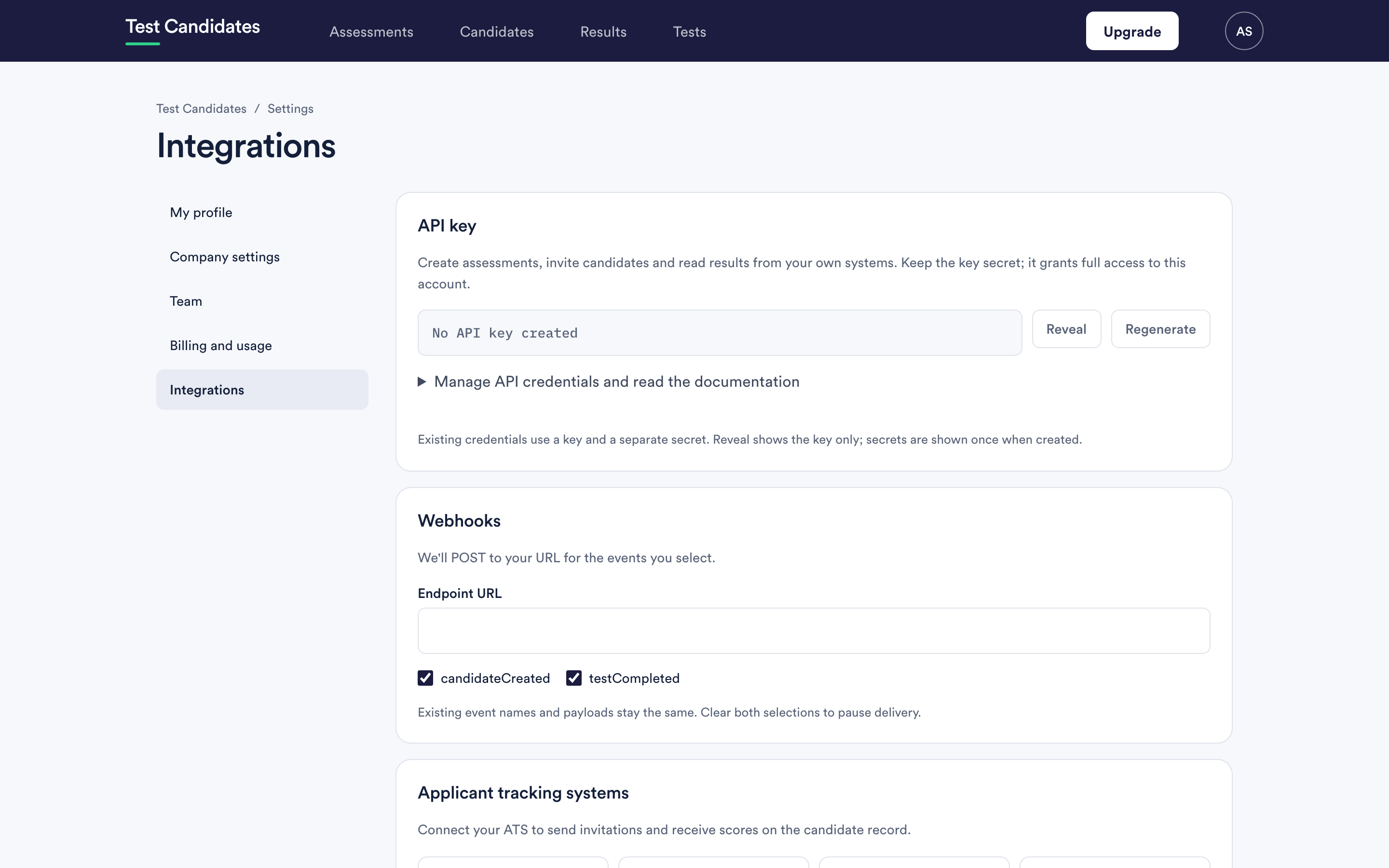
Setting a webhook up
Give us an endpoint URL and choose the events you want. We POST to that URL when they happen.
The endpoint must be a public HTTPS URL. An address inside your own network cannot be reached, and plain HTTP is not accepted.
Once the endpoint is saved, use Send test event to check it works. We send
a signed event called ping straight away and show you whether your endpoint
accepted it.
The events
| Event | When it is sent |
|---|---|
candidateCreated |
Someone registers for one of your assessments, before they have taken anything |
testCompleted |
A candidate finishes a test. One per test, not per assessment |
candidateInvited |
An invitation is created and its email queued, from the app or the API |
assessmentStarted |
A candidate opens the first test of an assessment |
assessmentCompleted |
A candidate finishes every test in an assessment |
resultUnlocked |
A result is unlocked after the test was completed, for example when you unlock it yourself |
candidateCreated and testCompleted are the defaults. If you set up a
webhook before the other events existed, those two are what you receive. The
other four are sent only if you select them, so a receiver built for the
original two never gets a payload it has not seen.
A candidate taking three tests produces three testCompleted deliveries, and
one assessmentCompleted if you have selected it.
The envelope
Every delivery has the same outer shape:
{
  "id": "evt_4f1c2a9b7d3e4a5f8b6c1d2e3f4a5b6c",
  "event": "testCompleted",
  "createdAt": 1791277200,
  "data": { ... }
}
idis fixed when the event happens. An automatic retry and a resend from the delivery log carry the sameid, so use it to ignore a delivery you have already handled.createdAt, and every other time in a webhook payload, is a Unix timestamp in seconds. (The API uses ISO 8601 times instead.)- A candidate's or assessment's
uuidin a webhook is the same value as itsidin the API.
What each payload contains
candidateCreated: the candidate's uuid, email, firstName,
surname and createdAt.
testCompleted: the candidate's candidateUuid, the testSlug,
completedAt, scorePercentage, speedCompleted (seconds),
questionsCorrect, questionsIncorrect, questionsTotal, result, scores
and unlocked.
resultUnlocked: the same fields as testCompleted, plus unlockedAt.
assessmentCompleted: the candidate (uuid, email, firstName,
surname), the assessment (uuid, name), completedAt, unlocked, a
tests list with each test's fields as in testCompleted, and reportUrl, the
candidate's page in the app. unlocked is true only when every test is.
assessmentStarted: the candidate, the assessment, the testSlug they
opened first and startedAt.
candidateInvited: the email, firstName and surname invited, the
assessment and invitedAt.
ping: a message and your organisationName. Only sent by Send test
event.
Locked results arrive without scores
testCompleted is sent once we have checked whether the result unlocks. If it
is locked, unlocked is false and the score fields (scorePercentage,
speedCompleted, questionsCorrect, questionsIncorrect, questionsTotal,
result and scores) are null. When it is unlocked later you get
resultUnlocked with the scores, if you have selected that event.
assessmentCompleted follows the same rule for each test in its list. It may
wait a short while for every test's unlock check to finish, so it can arrive a
little after the last testCompleted.
If your handler was built before October 2026, check it copes with null
scores, and select resultUnlocked to receive them once a result is unlocked.
Verifying a delivery
Every delivery carries two headers:
X-Webhook-Timestamp, the time the request was signed, in Unix seconds.X-Webhook-Signature, of the formsha256=followed by a hex HMAC-SHA256.
The HMAC is keyed with your signing secret and computed over the timestamp, a full stop, and the raw request body:
sha256=HMAC-SHA256(secret, "{timestamp}.{raw body}")
In Node.js, for example:
const crypto = require('crypto');

function verify(rawBody, timestamp, signature, secret) {
  const expected = 'sha256=' + crypto
    .createHmac('sha256', secret)
    .update(timestamp + '.' + rawBody)
    .digest('hex');
  return signature.length === expected.length &&
    crypto.timingSafeEqual(Buffer.from(signature), Buffer.from(expected));
}
Your signing secret is shown on the webhooks section once an endpoint is set.
Verify every delivery before you act on it, and compute the HMAC over the raw body rather than over a re-serialised version of the parsed JSON. Each send is signed with a fresh timestamp, including retries and resends, so you can also refuse a delivery whose timestamp is too old. Treat the secret with the same care as your API key.
Rotating the signing secret
Use Rotate secret in the webhooks section and confirm. You are shown the new secret once.
The old secret stops working at once. Every delivery from that moment, including retries and resends of earlier events, is signed with the new one, so update your receiver straight away.
Responding to a webhook
Answer quickly with a 2xx status and do your real work afterwards. We wait up
to 5 seconds to connect and 10 seconds in total, and anything other than a 2xx
counts as a failure. Redirects are not followed, so give us the final URL.
Build your handler to tolerate the same event arriving twice, using the id.
Retries
A failed delivery is tried three times in all: once when the event happens, again about 30 seconds later, and a last time about 5 minutes after that. After that we stop, and the delivery log shows what happened.
If you remove the endpoint, or deselect the event, before a retry is due, the retry is not sent.
The delivery log
The webhooks section lists your deliveries from the last 30 days, newest first. Each attempt shows the event, whether it was accepted, the status code your endpoint returned, how long it took, any error, and which attempt it was.
Resend sends a logged delivery again, with the same body and the same id,
to the endpoint saved now, signed with your current secret. Use it after you
have fixed your endpoint. Deliveries older than 30 days are deleted and cannot
be resent.
Test events and resends are limited to a handful a minute.
Pausing webhook delivery
Clear every event selection. The endpoint stays saved and nothing is sent until you select an event again. That is the tidy way to stop deliveries while you redeploy, without losing your configuration.
Changing the endpoint
Change the URL and save. Event names and payload shapes stay the same, so moving an endpoint does not mean rewriting your handler. Retries and resends go to the endpoint saved at the time they are sent.
Webhooks and the API together
A webhook is a good trigger and a poor source of truth. A common pattern is to
use testCompleted or assessmentCompleted as the signal and then read the
candidate from the API, which gives
you their whole history rather than one event.